



If you’re running a WordPress-powered online store or service-based website and looking for a simple way to accept global payments, Payoneer could be a powerful solution. While Payoneer is mostly known for facilitating cross-border payments and offering global receiving accounts, it can also be used as a payment gateway for your WordPress site—especially if you’re targeting international clients and freelancers.
In this blog post, we’ll discuss how to get started with the payoneer payment gateway for wordpress site, the official and unofficial plugins available for integration and some alternative payment gateways you might consider for your wordpress site.
What is Payoneer?
Payoneer is a financial services company that provides online money transfer and digital payment services. It’s widely used by freelancers, affiliate marketers, and eCommerce sellers for receiving international payments.
With over 5 million users globally, Payoneer offers the ability to:
- Send and receive funds in multiple currencies
- Withdraw directly to your local bank
- Receive payments from marketplaces like Amazon, Fiverr, Upwork
- Accept credit card payments from clients
It’s particularly known for its global reach, multi-currency support, and low fees, making it ideal for businesses that deal with international clients.
Can I Use Payoneer As A Payment Gateway For WordPress Site?
The short answer is: Yes. However, thanks to third-party developers and a the Payoneer official plugin, it’s now possible to use Payoneer as a payment gateway on WordPress, particularly with WooCommerce.
Use Cases of Payoneer Payment Gateway in WordPress
Here are scenarios where integrating Payoneer as a payment gateway makes a lot of sense:
- Freelance Portfolio Sites: Add a “Pay via Payoneer” button or payment gateway to receive direct payments from clients.
- Online Consulting Services: Collect consultation fees via Payoneer.
- Course Creators: Sell digital courses and collect fees through Payoneer Checkout.
- Membership Sites: Manually approve memberships once Payoneer payment is confirmed.
- Digital Product Stores: Provide manual payment instructions and deliver products once payment is received.
How To Integrate Payoneer Payment Gateway in WordPress
There are two main ways to integrate Payoneer with your WordPress site:
Method 1 : Using the Official Payoneer Checkout Plugin
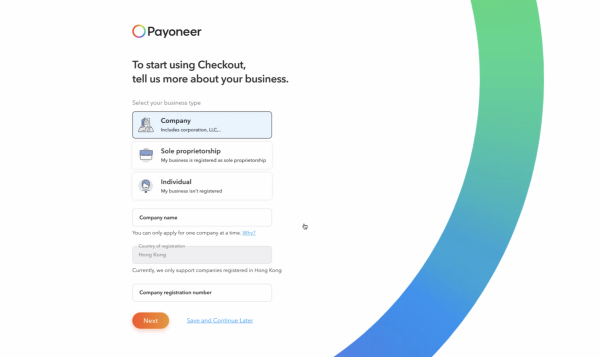
Payoneer has recently introduced its official plugin, Payoneer Checkout, which allows you to accept credit card payments from customers and settle them into your Payoneer account.
Key Features :
- Seamless WooCommerce integration
- Accept card payments directly on your site
- Funds go straight to your Payoneer balance
- Secure and PCI-compliant
Integration Steps

NOTE : According to Payoneer, to be eligible for the service you must have a Hong Kong entity or be willing to set one up and monthly webstore volumes above USD $20,000.
Method 2 : Using the Unofficial “Payment Gateway Payoneer For WooCommerce” Plugin by ThemeBing
If you don’t yet have access to Payoneer Checkout or you’re looking for a simpler integration, you can use the unofficial plugin developed by ThemeBing i.e Payment Gateway Payoneer For Woocommerce.
How Pay With Payoneer Works Via The Plugin by ThemeBing
This plugin doesn’t process real-time payments like Stripe or PayPal. Instead, it provides an option at checkout where the customer selects Pay via Payoneer. The site then displays instructions (such as your Payoneer email or receiving account details), and the customer sends the payment manually.
Payoneer Payment Gateway For WordPress : Integration Tips
- Use Email Notifications: Enable email notifications to alert you when an order is placed via the Payoneer method.
- Follow Up: Because the ThemeBing plugin involves manual payment, follow up with the customer to confirm receipt.
- Set Up Order Notifications: Keep track of pending orders awaiting payment.
- Provide Support Contact: Let users reach out if they get confused during payment.
- Display Clear Instructions: Especially if using the ThemeBing plugin, be transparent about the manual payment process.
Alternatives to Payoneer Payment Gateway for WordPress
While Payoneer is a powerful tool, it’s not the only option for accepting payments on WordPress. Here are some alternatives:
- PayPal
- Stripe
- Klarna
- Mollie
- Flutterwave
- Paystack
- RazorPay
Please Share :
Like What You Read?
Sign Up to get similar articles delivered to your email inbox.