


Google has been adding new changes to the Gboard for a personalised experience for users. After including toggle keys to remove some punctuation keys, it now rolls out an update that will make it quicker to access the hinted symbols.

Source: MobilityArena
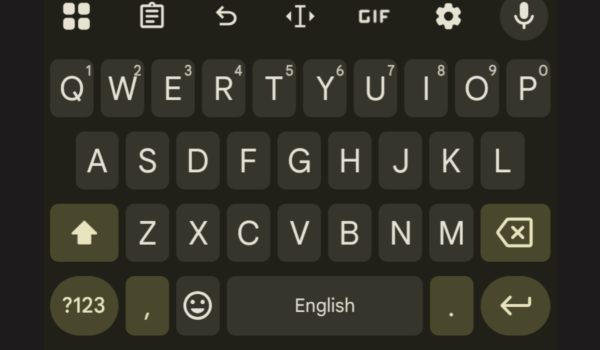
There is a new “Flick keys to enter symbols” feature under Gboard preferences. The toggle key allows users to touch a key and pull downward to enter its hinted symbol. This action is more like a flick of the key, but there is also a sensitivity option for users to set the action to how they prefer it.
Flick keys for hinted symbols
By “hinted symbol,” we mean extra characters seen at the top right corner of the keyboard letters. They are basically the numbers 1 to 10 on the top row of letters: Q, W, E, R, T, Y, U, I, O, and P. By pulling down the keys, each number can be entered, instead of the usual sub-menu.

Source: MobilityArena
Earlier, Google introduced an update for a more minimalistic keyboard, by hiding punctuation marks and making the spacebar wider. While some love the new look, others feel it makes their texts clumsy. Either way, it’s a toggleable option for Gboard users that is off by default.
Google has been rolling out updates to Gboard over the years, one of which is the popular Emoji Kitchen that makes expressing emotions easier and more fun. Who knows what it will bring to Gboard next?