

Most apps are offering year-end recaps to revisit your best memories and summarise how you spent 2025, from Spotify Wrapped to YouTube Recap. Google Photos is joining the game. On December 9, they launched a bunch of video editing tools to let you create that perfect post-worthy reel with catchy captions and cool music.

Source: Google
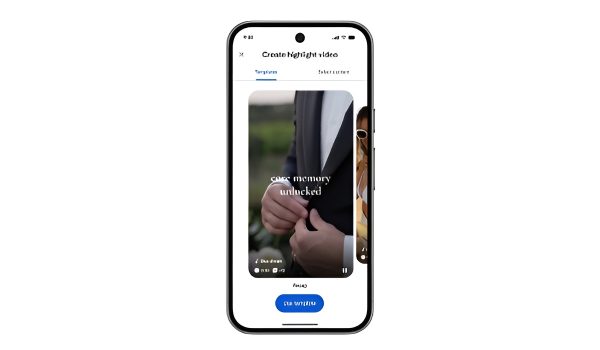
Google is making it easier for users to create a reel with multiple video clips and photos in Google Photos just by clicking the “Create” tab and hitting “highlight video.” You can pick the clips and pictures you want to include, and Google Photos will create a single video for you.

That’s not all. Instead of jumping through several hoops or using editing apps, you can easily fine-tune the highlight video. With ready-made templates and a redesigned video editor, you can add music and custom text to personalise your reels.

There are different templates on Google Photos to pick from, so you can pick a creative style for your highlight reel that suits your taste without wasting time on how to begin. Overall, the platform is more user-friendly and intuitive, supports multi-clip editing and storytelling, including an “adaptive canvas” to simplify the editing process. It helps you switch between clips easily or adjust the length of the video clip.

You can also edit and customise each video clip within the reel by adding music or custom text to it as well. You can add audio from the Photos’ music library and pick a matching track that gives the right vibe to your highlight video.
Google Photos now feels like CapCut and TikTok with the new text editing features, allowing users to do their video editing in one app without switching to other applications. With stylish text overlays, you can customise fonts, colours, and backgrounds to make your message prominent for highlight videos.